


Before Bitcoin traded its first candle of 2026, its annual pivot grid was already calculable. The central reference was close to $96,000. An outer support zone stretched from roughly $64,000 to $55,000. The inputs came from the year that had just ended.
That is the starting point for this guide: a map that exists before the next period unfolds.
Fibonacci pivot points turn a previous period’s high, low and close into a set of reference prices. The calculation is straightforward. The more interesting part is what happens when those prices remain on the chart while a new week, month, quarter or year develops.
Price can reach a zone, pause around it, move through it or never visit it. The grid gives those observations a common frame of reference. It does not determine which outcome will occur.
This is the first part of the TradeLean pivot-point series. We will build the map from the ground up, compare the standard Fibonacci settings with my TradeLean version, reconstruct the Bitcoin example in the video and finish with a practical workflow you can repeat on your own chart.
Three inputs
The previous period’s high, low and close provide everything needed to calculate the grid.
Two areas of focus
TradeLean emphasises the 0.184 and 0.702 zones on either side of the central pivot.
One fixed reference
Once the reference period has closed, its grid can remain fixed throughout the following period.
“Known in advance” describes the levels. It does not mean the next price move, its timing or its probability is known in advance.
Watch the roadmap take shape.
The original video walks through the indicator in TradingView, from the standard settings to Bitcoin’s annual grid. Keep it alongside the article if you prefer to see each calculation on a chart.
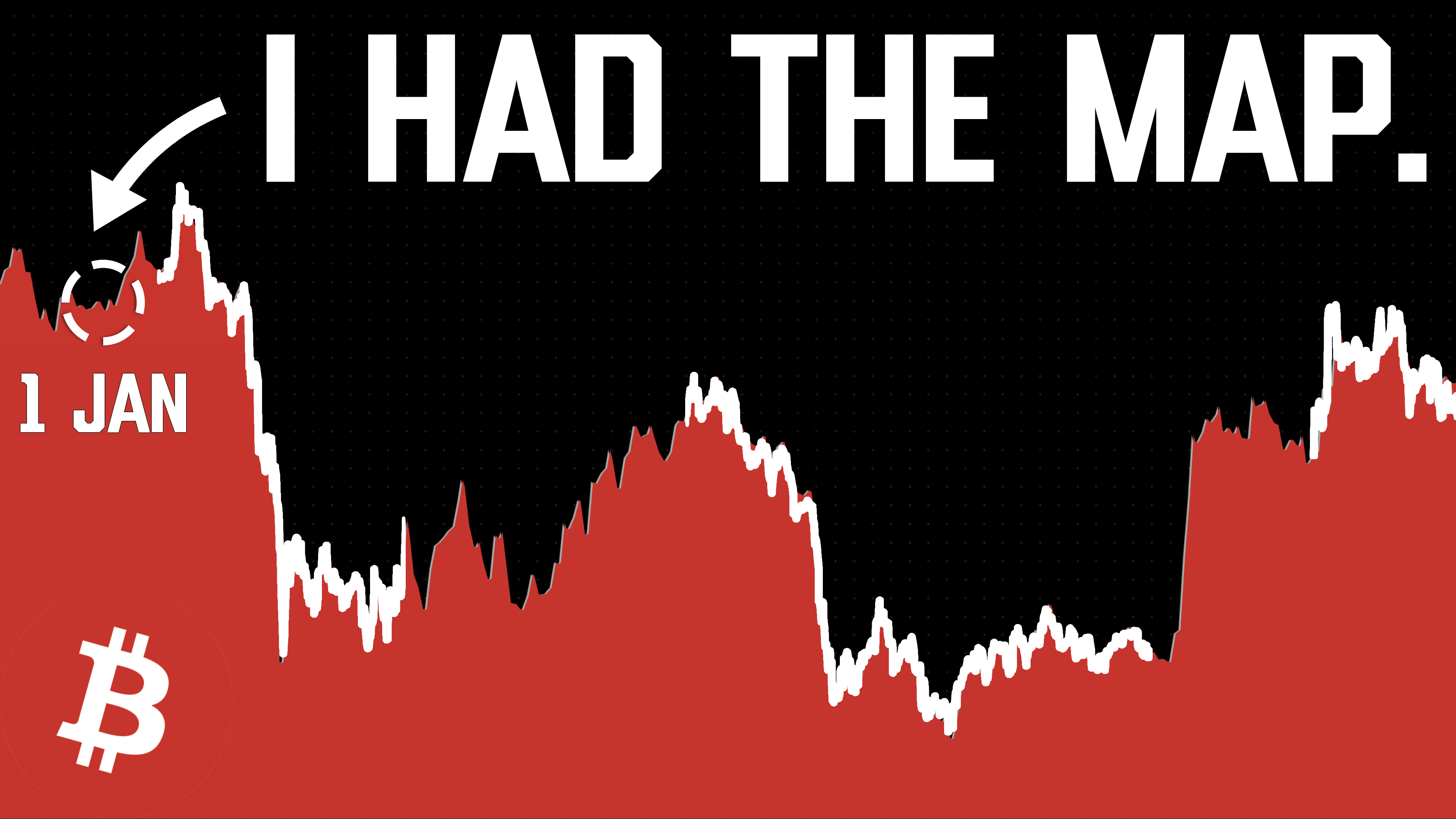
TradeLean · Published on YouTube, 20 October 2026. The article expands the explanation; figures from the recording are historical examples, not current quotes.
What are Fibonacci pivot points?
Fibonacci pivot points are support and resistance reference levels calculated from the previous period’s high, low and close. A central pivot, labelled P or PP, anchors the grid. Multiples of the previous high-to-low range place the R levels above it and the S levels below it.
The grid begins with a completed reference period. For monthly pivots, that is the previous month. For annual pivots, it is the previous year. The same principle applies to weekly and quarterly calculations.
There is no requirement to choose a swing high and a swing low by eye. Once you have defined the instrument, data source and reference period, the inputs are determined by that period’s price record. This makes it possible to calculate the same grid repeatedly and explain exactly where each number came from.
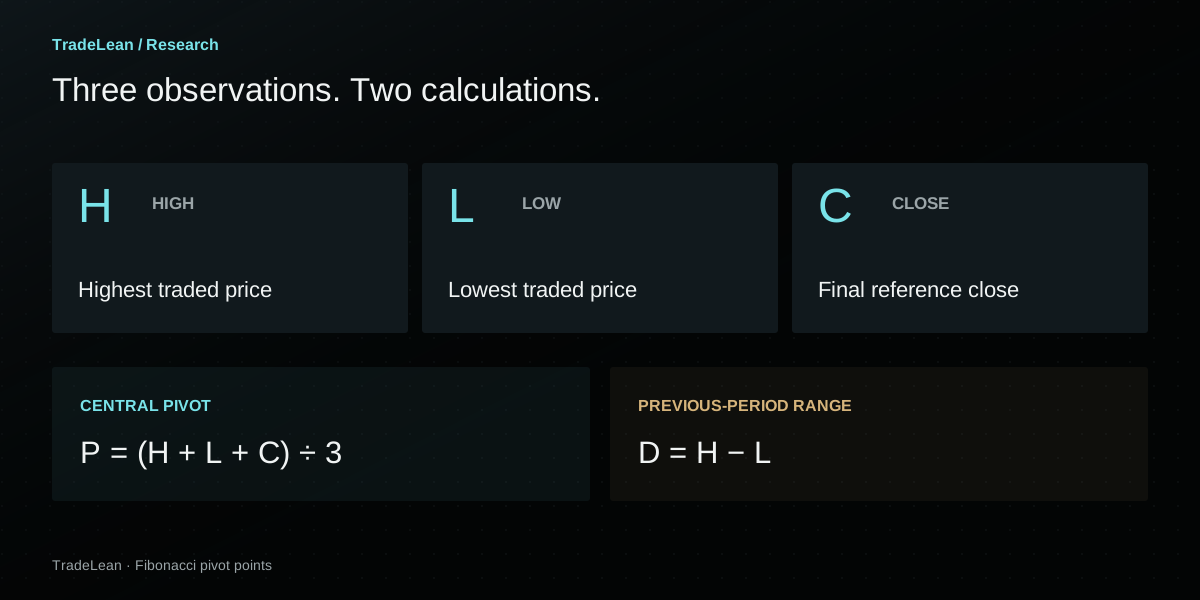
The central pivot is a reference price.
The pivot gives equal weight to three observations: the highest price, the lowest price and the final close. It is an arithmetic average of those observations. It is not a volume-weighted average, the average of every trade or an estimate of fundamental value.
That distinction matters. Calling the middle line “fair value” would imply more than the formula actually measures. Its practical value here is as the centre of a consistent price roadmap.
The range sets the spacing.
The distance from the previous high to the previous low determines how far the surrounding levels sit from P. A wide reference range produces wider spacing in price units. A narrow reference range produces tighter spacing. The method adapts to that observed range without requiring a new set of manually chosen distances.
This is also why the same ratio can produce very different dollar distances in different years. The ratio is fixed; the reference range changes. A 0.702 level is a relationship to that range, not a fixed percentage return from today’s price.
Pivot points
Anchored to a defined previous period. The central reference is calculated from high, low and close.
Fibonacci retracements
Usually anchored to selected endpoints of a price move. Sharing ratio labels does not make the two drawings interchangeable.
Why the levels exist before the move.
Consider the monthly example in the video. October’s Fibonacci pivot levels use September’s completed high, low and close. When September ends, those three observations are available. October’s grid can therefore be drawn as soon as the new month begins.
The annual example follows exactly the same logic. The 2026 annual grid uses 2025’s completed data. It does not need January’s high, a later sell-off or an October recovery to establish its position.
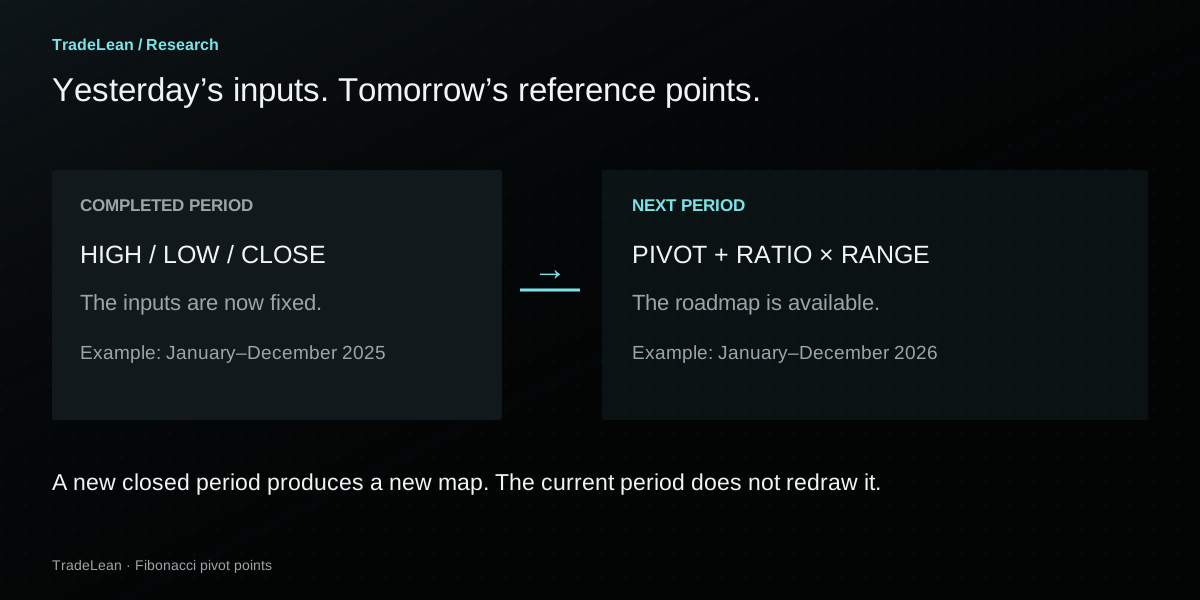
In the video, I describe this as a leading indicator. The useful meaning is that the reference prices are available ahead of the period’s subsequent trading. The formula still uses historical information. It does not introduce future information into the calculation.
Many familiar indicators update as new candles arrive. A moving average, for example, changes when its input window changes. A previous-period pivot grid behaves differently: the current period’s price action does not ordinarily alter the already completed inputs used for that grid.
That stability is valuable when reviewing an idea. You can record the grid at the start of the period, then compare later observations against the same reference. You do not need to move a line after the fact to make it fit a turning point.
“In essence, this tool gives you a price roadmap.”
Fixed does not mean immune to data differences.
A different exchange, session definition or underlying contract can supply different inputs. A data correction can also change a historical value. Two charts can therefore display slightly different pivots while both apply the formula correctly.
The discipline is to keep the inputs consistent: the same instrument, feed and reference period when comparing the start-of-period grid with later price behaviour. We will return to this when looking at the Bitcoin screenshots.
Fibonacci pivot point formula, step by step.
Start with three values from the previous completed period. Let H be its high, L its low and C its close. We will call the high-to-low range D.
P = (H + L + C) / 3D = H − LR(r) = P + r × DS(r) = P − r × DThere are only two operations after finding P: multiply D by the chosen ratio, then add or subtract the result. Upper and lower levels are symmetrical around the pivot in price units.
A simple numerical example.
Suppose a completed month has a high of 120, a low of 80 and a close of 100. The central pivot is 100 and the range is 40. At a ratio of 0.382, the offset from P is 15.28. That puts the upper level at 115.28 and the lower level at 84.72.
Nothing in that calculation requires the following month’s prices. Nothing in it specifies whether 115.28 or 84.72 will be visited first. Separating those two statements keeps the arithmetic useful without assigning it predictive powers it has not demonstrated.
| Label | Calculation | Result |
|---|---|---|
| R3 | 100 + 1.000 × 40 | 140.00 |
| R2 | 100 + 0.618 × 40 | 124.72 |
| R1 | 100 + 0.382 × 40 | 115.28 |
| P | (120 + 80 + 100) / 3 | 100.00 |
| S1 | 100 − 0.382 × 40 | 84.72 |
| S2 | 100 − 0.618 × 40 | 75.28 |
| S3 | 100 − 1.000 × 40 | 60.00 |
Formula reference: TradingView’s Pivot Points Standard documentation ↗. The numbers in this small example are hypothetical.
Do not confuse a 0.382 multiplier of D with 38.2% of the pivot price. In the example, 0.382 × 40 is 15.28; 38.2% of 100 would be 38.20. They answer different questions and place the lines at different prices.
How to set up Fibonacci pivots in TradingView.
You can follow the basic method with TradingView’s built-in indicator. Start there if you want to understand the calculation before adding the TradeLean version.
Open the intended instrument.
Check the full symbol and exchange or data provider. BTC/USD and BTC/USDT are different series; an index and its futures contract are different instruments.
Add “Pivot Points Standard”.
Open Indicators, search for the name and choose TradingView’s built-in indicator. In its settings, set the calculation type to Fibonacci.
Choose the pivot reference period.
For the monthly example, explicitly select Monthly. For the annual example, select Yearly. This avoids relying on an automatic mapping you may later forget you selected.
Reduce the visible history.
Display one set of pivots while learning the current grid. Older sets can be useful later, but too many overlapping labels obscure the calculation you are trying to understand.
Make the labels readable.
Show the labels and prices. Position them on the right if that leaves the candles easier to see. Keep enough space on the price axis to distinguish the levels.
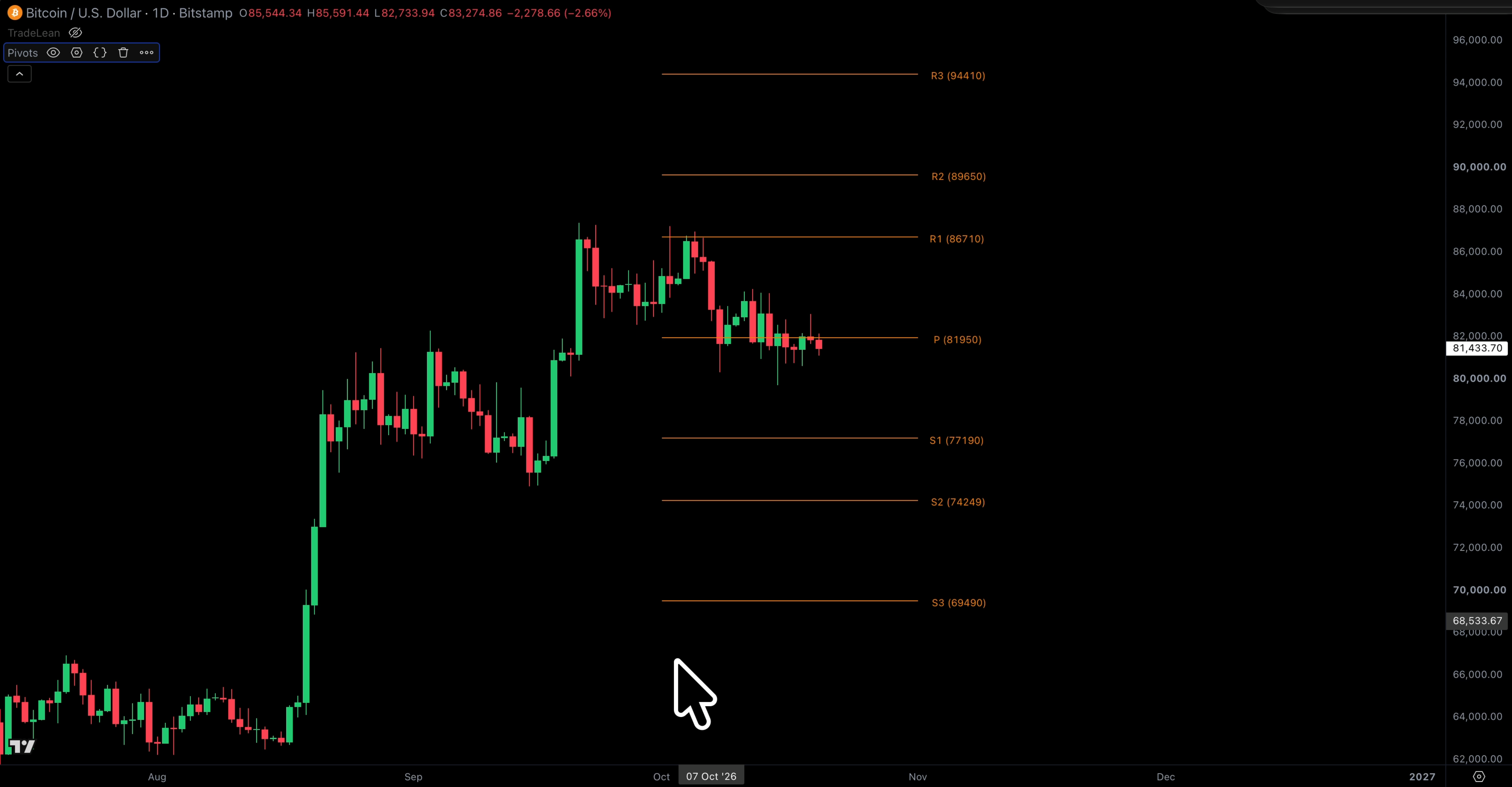
Chart timeframe and pivot timeframe are separate choices.
A daily chart means each candle represents one day. Monthly pivots mean the grid uses the previous month’s data. You can display those monthly levels over daily candles. The candle resolution and the reference period do not have to match.
In the original demonstration, the built-in indicator’s Auto setting maps a daily chart to monthly pivots. That is a convenience of the indicator’s configuration, rather than a rule that every daily chart must use a monthly grid. Selecting the pivot period explicitly makes the example easier to reproduce.
| What you select | What it controls | Example |
|---|---|---|
| Chart timeframe | The duration represented by each candle | Daily candles |
| Pivot timeframe | The completed period supplying H, L and C | Monthly pivots from the previous month |
| Visible pivot history | How many completed grids are displayed | One current set while learning |
If your labels do not match someone else’s chart, check those settings before changing the formula. TradingView also documents differences between daily-based and intraday data, extended sessions and futures settlement closes. Those choices can alter the reference observations.
What changes in the TradeLean version?
The central calculation stays the same. TradeLean’s P still comes from the previous high, low and close. The range is still H minus L. The change is the selection of ratios that receives the most attention.
The standard Fibonacci set centres on 0.382, 0.618 and 1.000. In my own roadmap, the primary references are P and the areas around 0.184 and 0.702. Other ratios can remain useful landmarks; a cleaner starting view simply gives the primary zones more room.
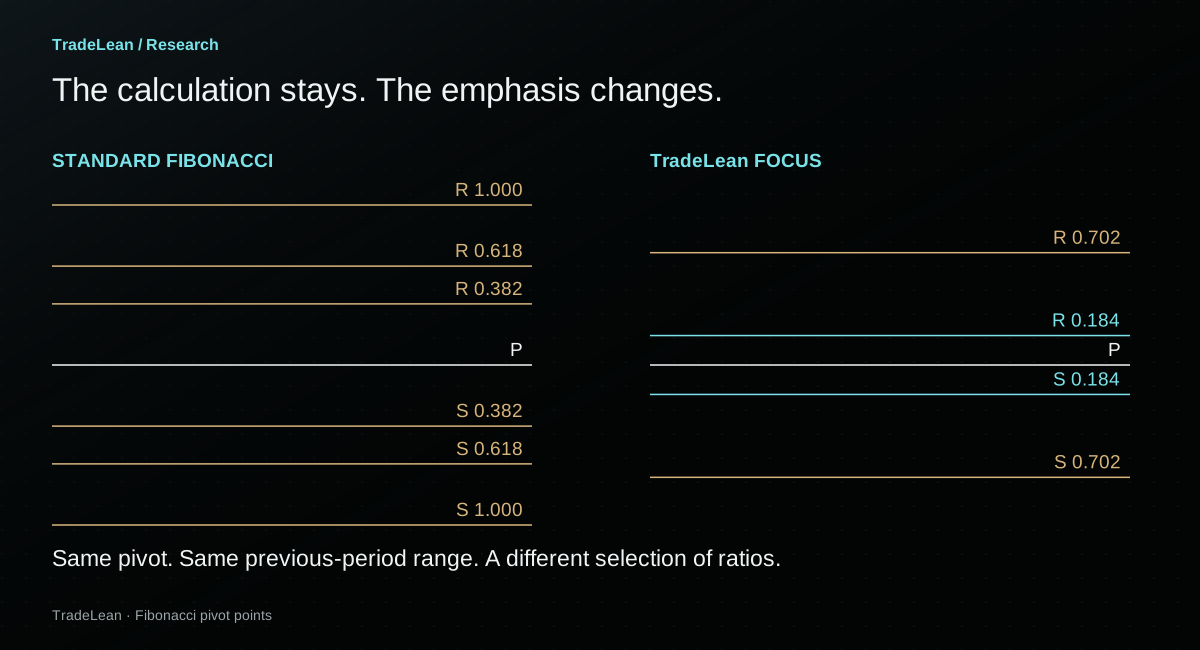
The labels name the ratio directly. R 0.184 means the pivot plus 0.184 times the previous range. S 0.702 means the pivot minus 0.702 times that range. A standard R1 at the 0.382 ratio is therefore R 0.382 in this naming system.
This is helpful when comparing charts. “R1” depends on the indicator’s calculation type. A label such as R 0.382 makes the multiplier explicit. It also makes the arithmetic easier to audit: you can identify the pivot, measure D and reconstruct the line.
| Standard Fibonacci label | Ratio label | Distance from P |
|---|---|---|
| R1 / S1 | R 0.382 / S 0.382 | 0.382 × D |
| R2 / S2 | R 0.618 / S 0.618 | 0.618 × D |
| R3 / S3 | R 1.000 / S 1.000 | 1.000 × D |
| TradeLean inner focus | R 0.184 / S 0.184 | 0.184 × D |
| TradeLean outer focus | R 0.702 / S 0.702 | 0.702 × D |
Why those two ratios?
They are the areas I emphasise in the approach introduced in this series. Video establishes their calculation and shows how they fit on the chart. It does not present a statistical study proving that these ratios outperform every alternative.
The arithmetic is fully reproducible. The claim that one selection of levels offers a useful analytical advantage is a separate question, and deserves evidence across more than a few memorable examples. For now, the aim is to understand the map you are looking at and the exact observations behind it.
Why I draw zones around the levels.
A perfectly thin line can suggest a degree of precision that a price chart does not consistently provide. Price may turn just above it, move briefly beyond it or spend several candles moving back and forth around it.
TradeLean represents the primary references as bands. The inner 0.184 zone runs between the 0.146 and 0.236 ratios. The outer 0.702 zone runs between 0.618 and 0.786. These are defined boundaries, calculated from the same pivot and range as the centre line.
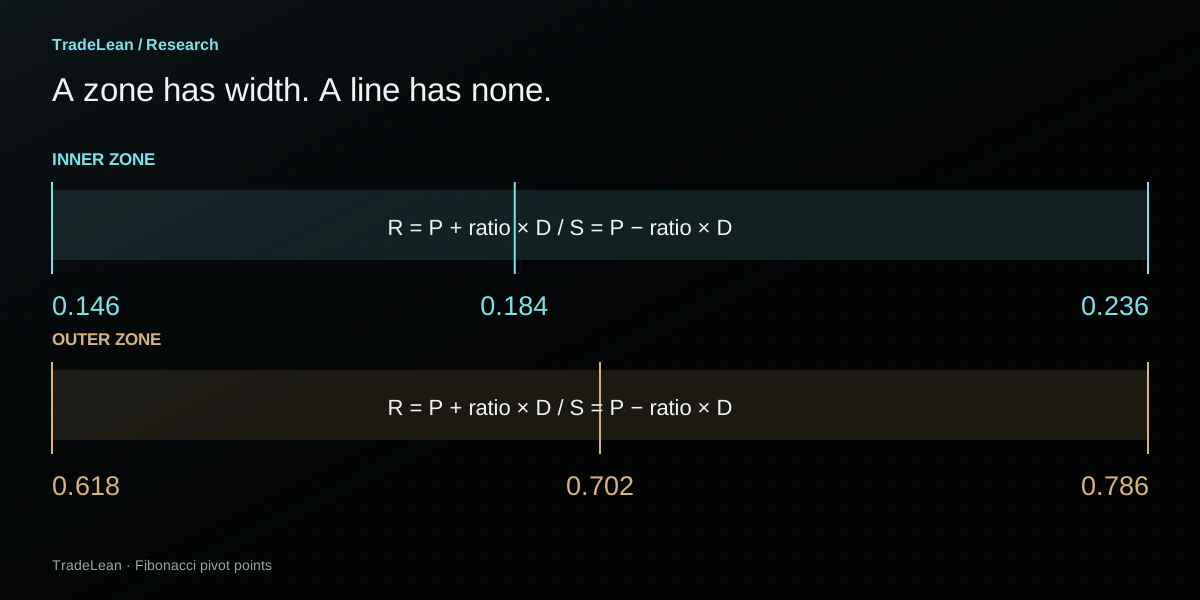
On the upper side of P, both boundaries are added to the pivot. On the lower side, both are subtracted. Because subtracting the larger ratio produces the lower price, it helps to put the resulting prices in ascending order when writing a lower zone as a range.
P − 0.786D ≤ price ≤ P − 0.618DThe 0.702 line sits inside that band. The band’s width is 0.168 × D.
For the inner zone, the width is 0.090 × D. The 0.184 reference lies within it, but it is not the arithmetic midpoint of the 0.146–0.236 boundaries. The label identifies the focal ratio, not a promise of perfect symmetry around that focal line.
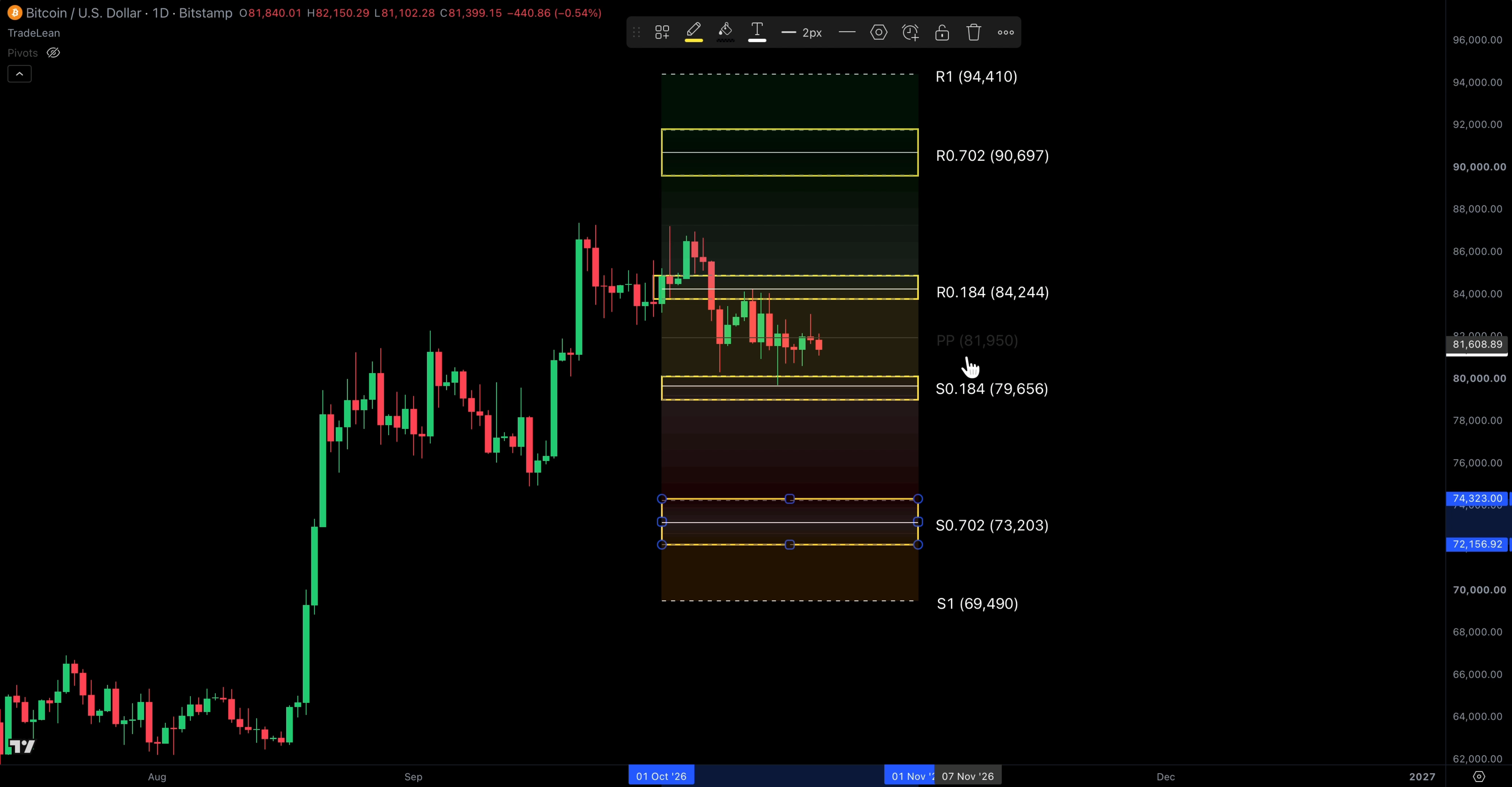
In the video I describe these areas as magnets. That is a description of how I watch price interact with them, not a literal force or a guarantee that price will travel there. A chart example can show consolidation around a zone; it cannot, by itself, establish how often that happens across all markets.
The benefit of a defined band is practical: it gives a price observation some context. A brief move across the central line of a zone is different from a move across its full width. You can describe that difference without pretending that one exact tick settles the interpretation.
Keep the boundaries unchanged while reviewing the example. Expanding a zone only after price narrowly misses it makes an illustration look more persuasive, but makes the method less reproducible.
Bitcoin Fibonacci pivots: the 2026 example.
The video’s annual Bitcoin example uses the preceding year’s high, low and close. The spoken figures are rounded: a 2025 high around $126,000, a low around $74,400 and a close around $87,500.
We can reconstruct the calculation from those inputs. Keeping the arithmetic visible is more useful than treating the finished chart as a black box.
The sum is $287,900. Dividing by three gives a central pivot of approximately $95,966.67. Subtracting the low from the high gives a range of $51,600.
For the inner support reference, multiply $51,600 by 0.184 to get $9,494.40, then subtract it from P. The result is approximately $86,472.27. For the outer support reference, the 0.702 offset is $36,223.20, producing approximately $59,743.47.
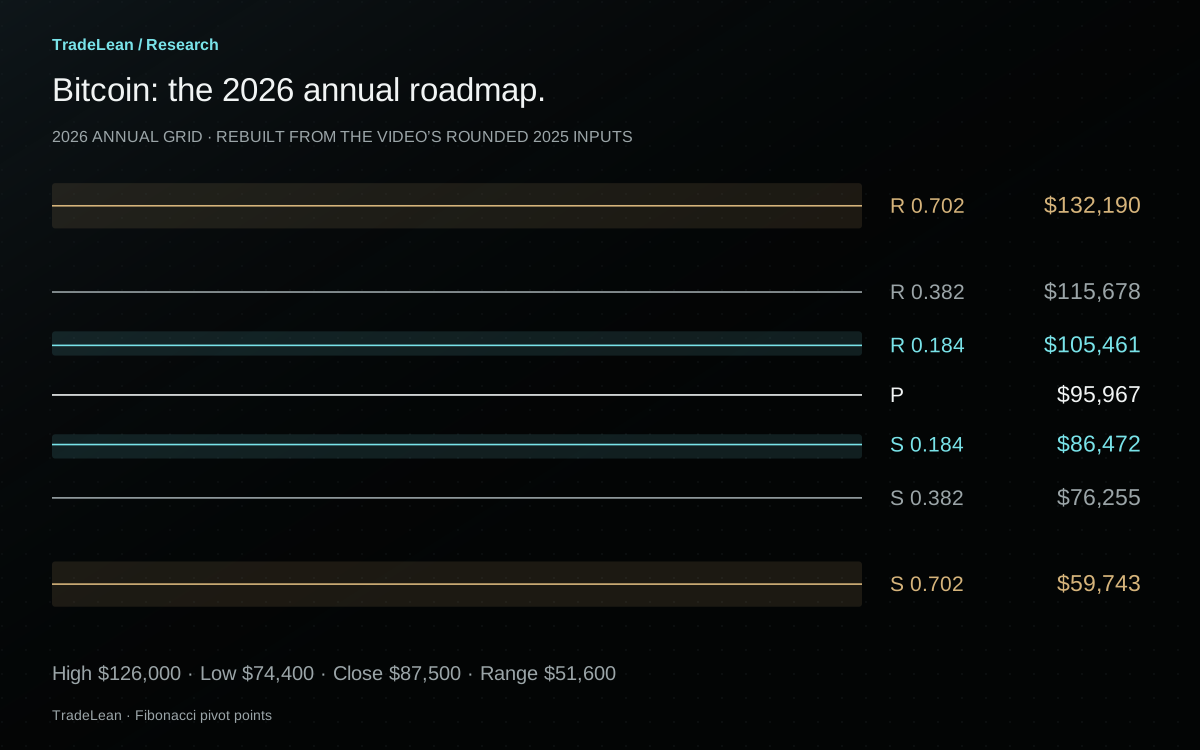
| Reference | Formula | Approximate price |
|---|---|---|
| R 0.702 | P + 0.702D | $132,190 |
| R 0.382 | P + 0.382D | $115,678 |
| R 0.184 | P + 0.184D | $105,461 |
| P | (H + L + C) / 3 | $95,967 |
| S 0.184 | P − 0.184D | $86,472 |
| S 0.382 | P − 0.382D | $76,255 |
| S 0.702 | P − 0.702D | $59,743 |
The outer support is a band around $60,000.
The upper boundary of the lower 0.702 zone is P minus 0.618D, approximately $64,077.87. The lower boundary is P minus 0.786D, approximately $55,409.07. That is the source of the roughly $64,000–$55,000 area discussed in the recording.
Notice how much information that adds to the focal line near $60,000. A move into the band at its upper boundary is already a zone interaction. It does not need to touch the 0.702 centre reference to count as entering the defined area.
Why the reconstructed numbers differ from the screen.
The original chart displays more precise feed values, while the narration rounds H, L and C for explanation. On the Bitstamp annual-grid screenshot below, P is about $96,067 and S 0.184 is about $86,524. Small differences from the table are expected when the inputs differ.
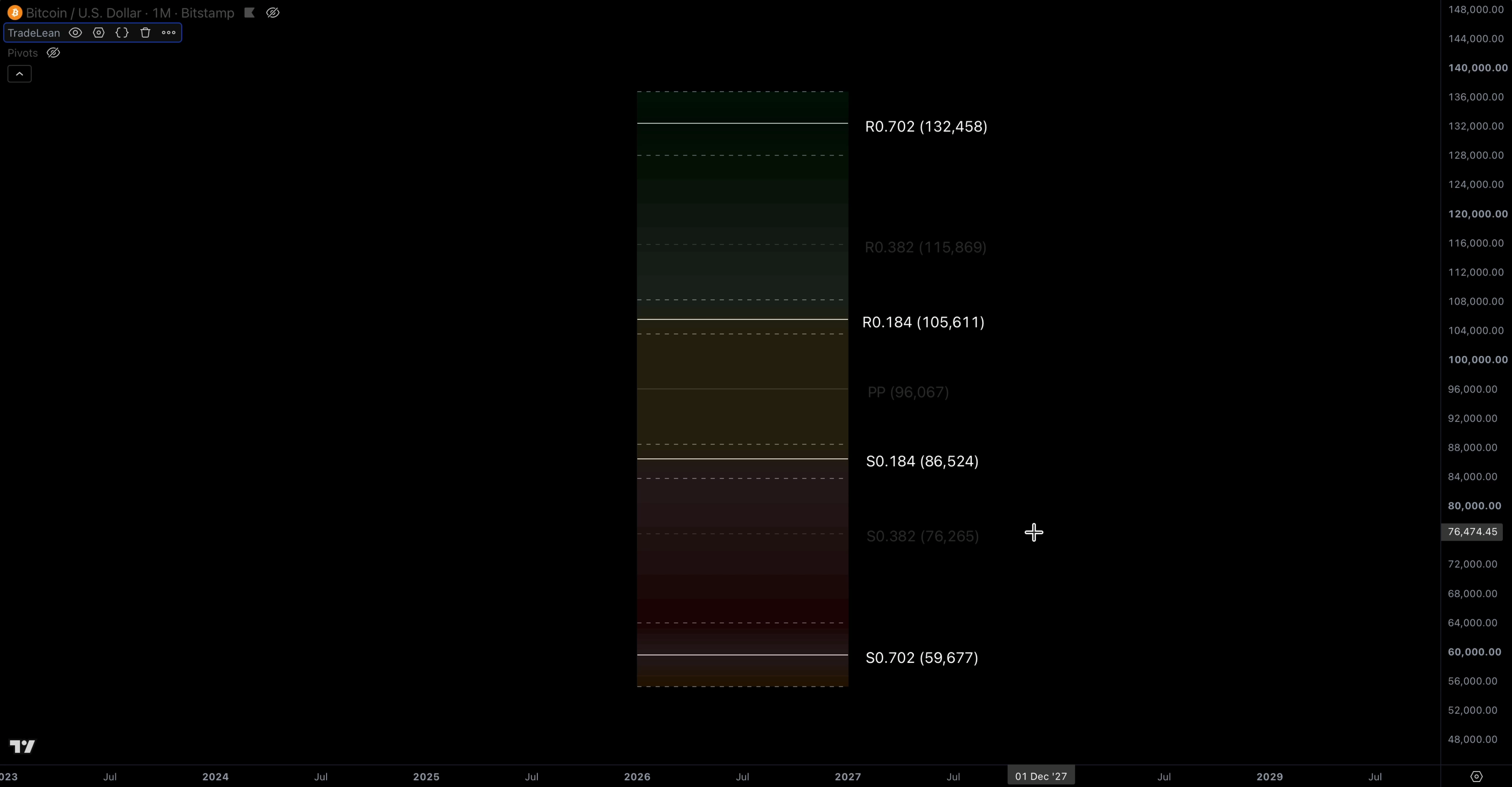
The later price-action screenshot uses a Binance BTC/USDT chart, with P around $96,119 and S 0.184 around $86,602. Those labels are close, but they are not identical. The exchange and quoted pair are visible in the chart heading. That is a useful reminder to distinguish an explanatory reconstruction from an exact feed-specific replication.
For your own work, choose one price series and retain its full-precision inputs. Round for presentation only after calculating. If someone else gets a slightly different level, comparing the underlying observations usually explains more than debating the last few dollars.
Fibonacci pivot point calculator.
Change the three inputs below to see how the pivot, primary references and zone boundaries respond. The default values reproduce the rounded Bitcoin example. The calculator performs the arithmetic in your browser; it does not retrieve quotes or evaluate a trading strategy.
Your pivot grid.
| Reference | Lower side | Upper side |
|---|---|---|
| 0.184 line | 86,472.27 | 105,461.07 |
| 0.702 line | 59,743.47 | 132,189.87 |
Using the rounded Bitcoin example.
Try changing only the close. The pivot and every surrounding level move by one third of that change, because the high-to-low range has stayed constant. Now change the high while keeping the low fixed. Both the central pivot and the range change, so the distances between levels change as well.
This small exercise makes the grid easier to interpret. A shift in P reflects a change in the three-input average. A change in the spacing reflects a change in the previous period’s range. Neither should be mistaken for a new observation about the current period’s future path.
What the Bitcoin example actually shows.
In the demonstration, the grid comes first and the price series comes second. Hiding the candles briefly makes it easier to see which references come from the calculation and which observations depend on what happened afterwards.
The recorded example then follows three broad stages: a January test of the annual pivot around $96,000, a decline into the lower 0.702 zone and a later recovery towards S 0.184 around $86,500. Each stage has a place on the same annual map.
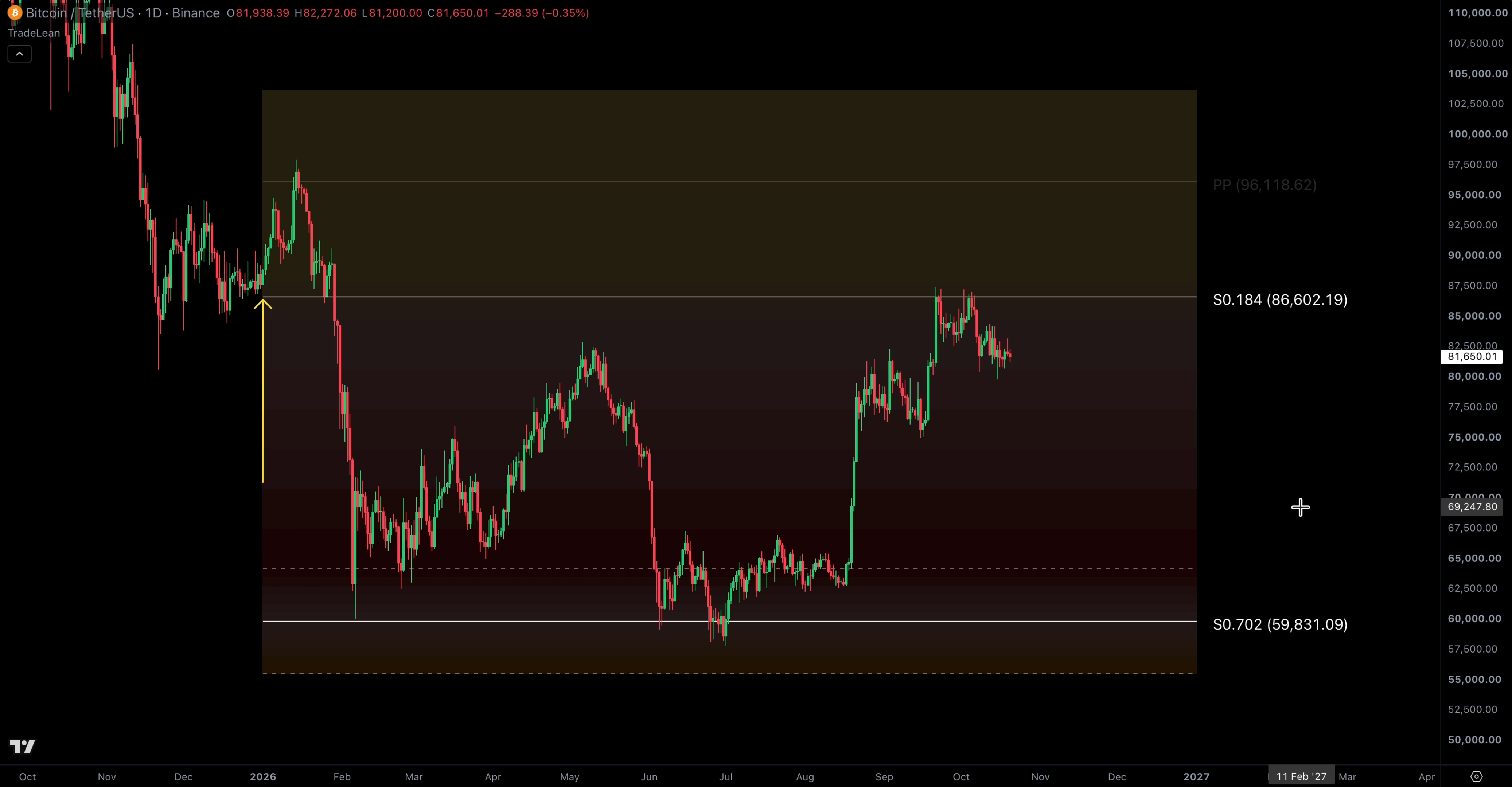
Annual pivot
The January move reaches the vicinity of P. The video discusses the subsequent rejection from that area.
S 0.702 zone
The decline enters the lower annual band. Its boundaries were defined by the prior year’s data.
S 0.184
The later rebound approaches the inner support reference, providing another location on the original grid.
The sequence is useful because it connects several observations through one calculation. It is more informative than pointing to a single low and saying that a line happened to be nearby.
It still remains a selected historical example. The recording was made after those price moves had occurred. The fact that the levels were calculable on 1 January does not demonstrate that a specific path was publicly forecast on that date, or that every decision using the grid would have been profitable.
Keep location separate from a decision.
A price at S 0.702 tells you where it sits relative to the annual grid. A trade requires further decisions: what observation would justify acting, what would invalidate that interpretation, how a position would be sized and how execution costs would be handled. The formula does not make those decisions for you.
That is why I introduce the roadmap before discussing how to read price location in the next video. First establish the reference. Then develop a consistent interpretation of what price does around it.
The same calculation on another market.
The second market in Video is the S&P 500. The annual pivot is quoted at roughly 6,200, with the upper 0.702 zone around 7,490–7,840. The units are index points rather than dollars per Bitcoin. The calculation remains the same.
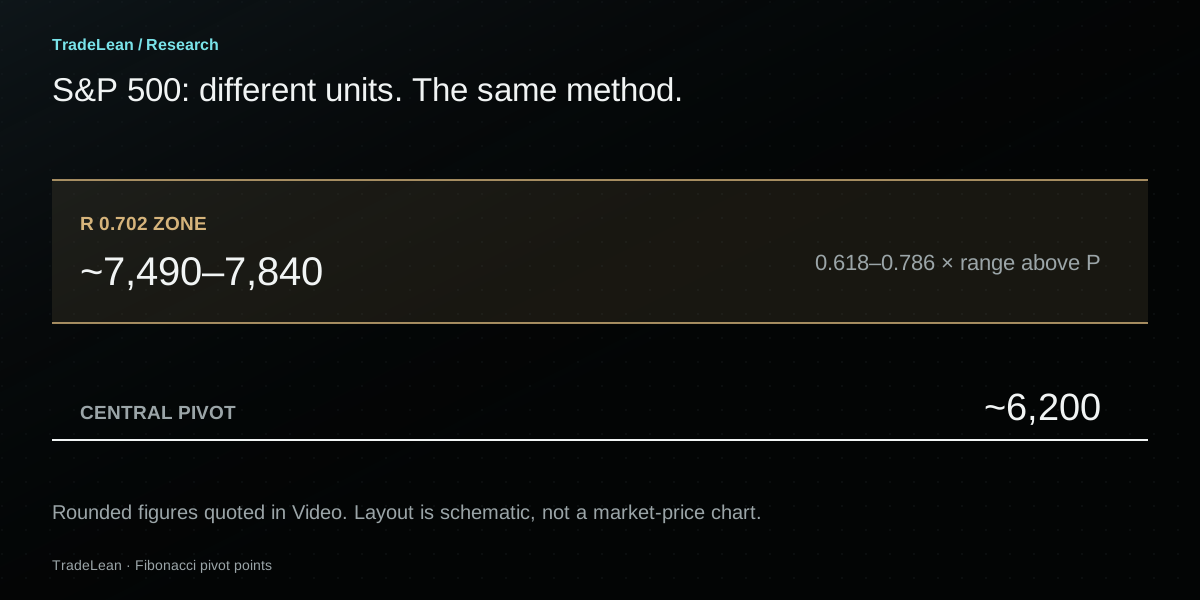
This is the transferable part of the method: a defined previous period supplies H, L and C, and the selected ratios place the surrounding references. The grid does not need a new formula simply because the instrument changes.
The interpretation does need context. A cash equity index has different trading hours from a continuously traded cryptocurrency. A futures contract can introduce settlement conventions and rollover considerations. A thinly traded instrument can have gaps or isolated prints that materially affect its high or low.
One method, several reference periods.
| Grid | Inputs come from | Next reset |
|---|---|---|
| Weekly | The previous completed week | Start of the next defined trading week |
| Monthly | The previous completed calendar month | Start of the next month |
| Quarterly | The previous completed calendar quarter | Start of the next quarter |
| Yearly | The previous completed calendar year | Start of the next year |
An annual grid can remain relevant while many weekly grids come and go. That does not make every weekly reference subordinate in every situation; it means the two calculations describe different observation windows. Combining them is a separate step, covered later in the series.
For this first exercise, keep one reference period visible. It is easier to understand a clean annual or monthly grid before introducing several sets of bands into the same view.
A roadmap is only part of the analysis.
The most attractive feature of the grid—its availability at the start of a period—is also easy to overstate. Drawing a set of levels early does not tell us how likely each level is to be reached, how long a reaction will last or whether a move through a zone will reverse.
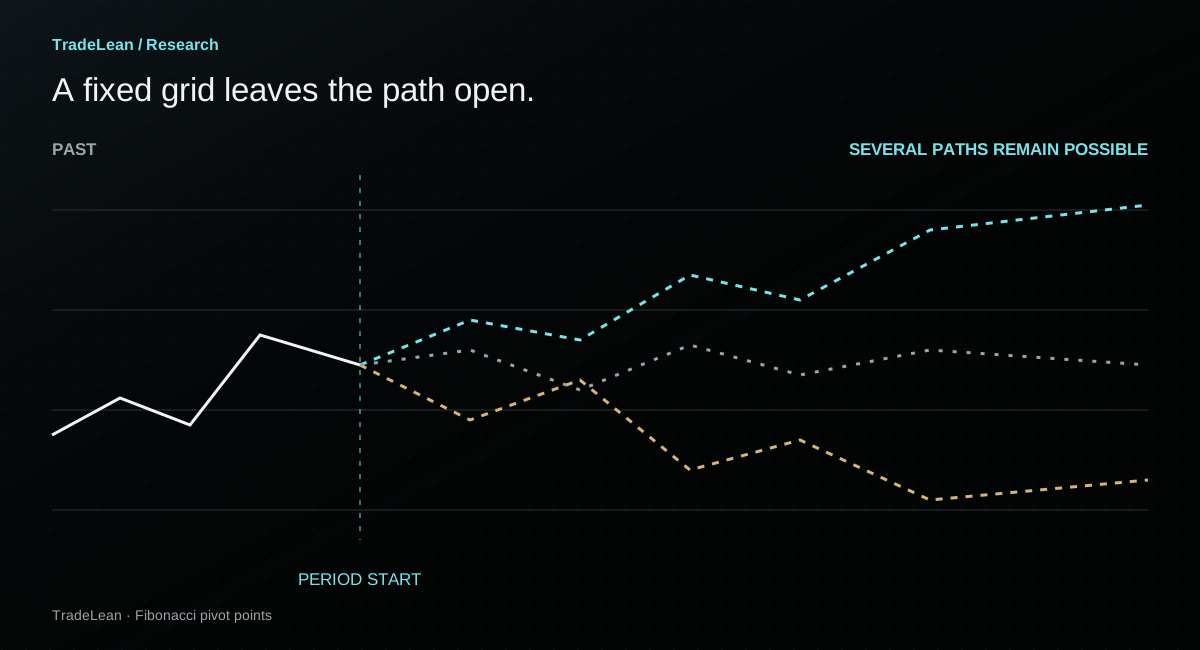
| The grid establishes | A separate question remains |
|---|---|
| Where P and the selected ratio levels sit | Whether price will reach them |
| Which previous period produced the inputs | When any reaction will occur |
| The exact boundaries of each zone | Whether a touch produces a lasting turn |
| A repeatable way to describe price location | Whether a defined strategy has an advantage after costs |
A support label does not place a floor under the market. A resistance label does not prevent a further rise. Price can move beyond the visible grid, and the outer zone is not a mathematical maximum or minimum for the coming period.
Useful examples are the beginning of a research question.
If you want to investigate whether the zones offer an advantage, define the test before reviewing the outcomes. Specify what counts as a visit, the price behaviour you will measure afterwards, the time allowed for that behaviour and how repeated visits are treated.
Then include the unremarkable cases: periods when a zone was never reached, when price passed through it and when a promising reaction failed. Comparing only the most striking turns makes almost any collection of lines look convincing.
A strategy test also needs execution assumptions. A daily candle can cross several levels without revealing the precise sequence of intraday fills. Spreads, fees, slippage and gaps can separate an attractive chart illustration from a feasible result.
The grid is one tool in the toolbox. Its role here is to organise observations and make the reasoning visible. The decision remains yours.
A cleaner way to review your next chart.
The best first exercise is deliberately simple. Choose one instrument, one feed and one reference period. Calculate or display the grid, record the inputs and observe how the next period develops without altering the original boundaries.
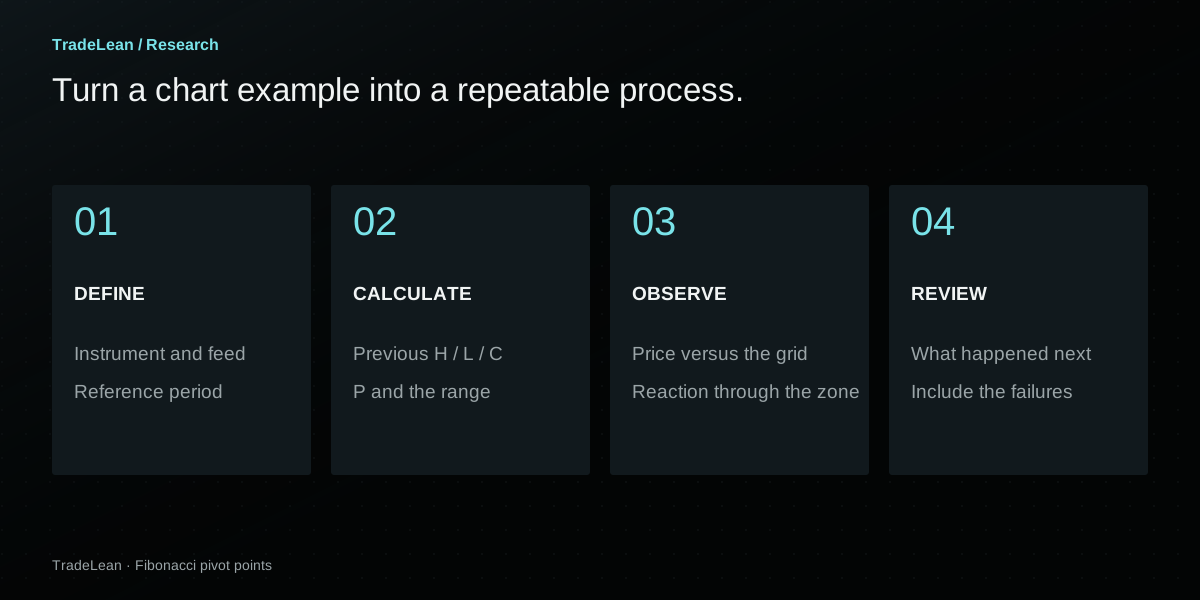
- Write down the definition. Record the full symbol, provider, quote currency, session settings and pivot period. A screenshot of the labels is useful, but it should accompany the settings rather than replace them.
- Check the arithmetic once. Recalculate P and one upper and lower level. This catches the common mistakes: the wrong period, a Traditional setting left on instead of Fibonacci, or a percentage applied to price instead of the range.
- Keep the first view uncluttered. Start with P, the 0.184 zones and the 0.702 zones. Add intermediate references when they answer a specific question, rather than filling every available price with a label.
- Record the observation before the outcome. Note the location, date and behaviour that attracted your attention. If you have an interpretation, write down what would change it.
- Review the full period. Include the moves that did not fit the initial interpretation. When the reference period resets, save the old view before starting with the new grid.
Over time, those records become more useful than a collection of isolated screenshots. They let you compare like with like and recognise when a memorable example has started to stand in for a broader body of evidence.
The pivot-roadmap worksheet.
A printable checklist for inputs, levels, observations and review.
Getting the TradeLean indicator.
In TradingView, open Indicators and search for TradeLean, as shown in the video. Check the indicator’s author and description before adding it. The free version introduced in this series applies the ratio and zone approach explained above.
If you cannot find it, the built-in Fibonacci pivot indicator is enough to practise the core calculation. You can also use the calculator in this article to verify the custom references manually. For access questions, contact TradeLean with the exact indicator name you see.
Questions about Fibonacci pivots.
Are these levels known before the period begins?+
They become calculable once the previous reference period has closed and its final data are available. Annual pivots for 2026 use 2025’s completed high, low and close. The calculation does not require 2026’s later prices.
Do the levels repaint?+
A grid built exclusively from the previous completed period should remain fixed during the current period. It resets at the next period boundary. A different data feed, a corrected input or a different script configuration can change the displayed result; a grid using the current unfinished period is a different calculation.
Is the pivot the same as the previous close?+
No. The previous close is one of three inputs. P equals the close only when the previous high plus low equals twice the close. Otherwise the average of H, L and C will sit elsewhere.
Does a 0.702 level imply a 70.2% price move?+
No. It is 0.702 times the previous period’s high-to-low range, measured above or below P. It is not a 70.2% return measured from today’s price, the previous close or the pivot.
Why are my Bitcoin prices slightly different?+
Compare the exchange, quote pair, reference period, session boundaries and input precision. The article’s worked table uses rounded narration inputs. The video screenshots display feed-specific values, including both Bitstamp BTC/USD and Binance BTC/USDT examples.
Must price stay inside the outer zones?+
No. The zones are reference bands, not limits on future prices. A market can move beyond them, and their presence alone does not establish a reversal.
Is the grid a complete trading strategy?+
No. The grid defines locations. A strategy additionally needs entry and exit rules, invalidation conditions, position sizing and execution assumptions. This guide does not establish a profitable strategy or provide a recommendation for a particular trade.
Keep the method within reach.
The useful next step is to put a clean grid on a chart and check that you can explain every line. These resources let you revisit the demonstration, verify the standard formula and continue into price location.
Pivot Points Explained: Bitcoin’s 2026 Levels, Set on January 1
Settings, calculations and the annual Bitcoin example.
Watch ↗TradingViewCheck the standard formula
Fibonacci calculations and the indicator’s reference-period settings.
Read the reference ↗InstagramThe zones in one clip
The boundaries around the 0.184 and 0.702 references.
Open the reel ↗XJoin the discussion
The published post introducing the roadmap video.
View post ↗Bitcoin / US dollar · Bitstamp
Andrey
Founder of TradeLean. Engineer with a PhD, senior industry executive and long-time investor and trader. The work brings Lean thinking to chart analysis, historical research and market foresight.
About the author ↗Educational research, not personal investment advice. Examples explain a method and do not establish its future performance. Read the Risk Disclaimer.